Maintenance, certificates and crew of your whole fleet. In one app.

For river cruise ships and inland shipping. No more Excel, binders and WhatsApp groups: the crew works on a phone on board, the office sees every ship.

Book a 20-minute demo

After that: 30 days free on your own ship. Watch the 2-minute video

Questions? Call or WhatsApp me: +31 6 41797246

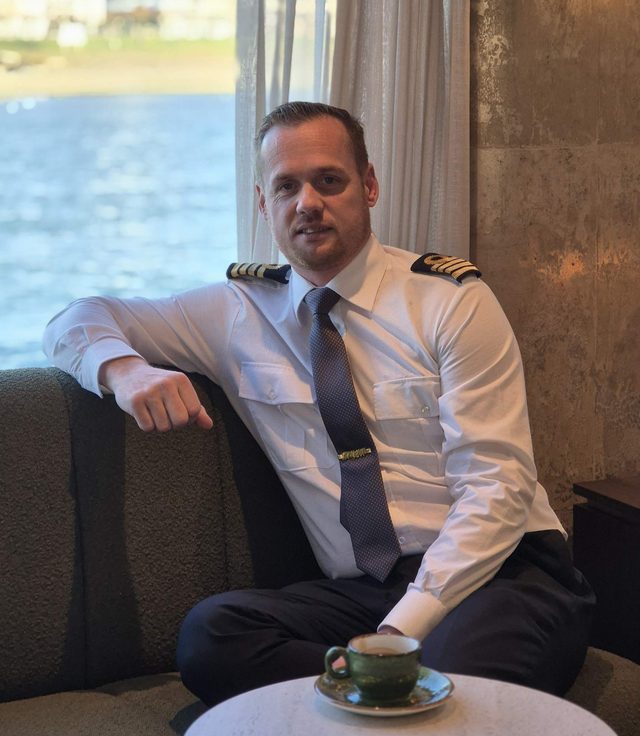
Wouter RietveldWouter Rietveld · captain and maker of RiverBase
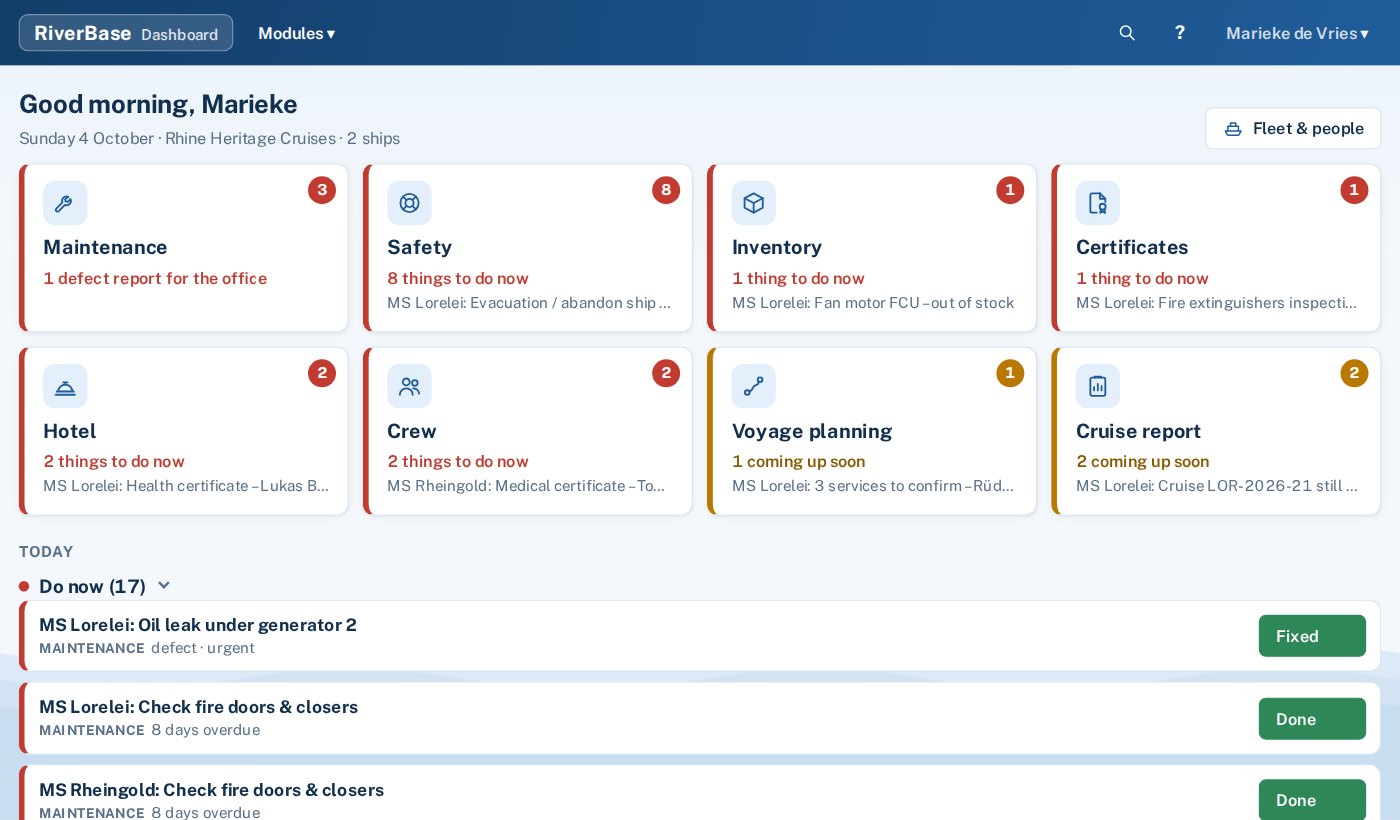
RiverBase dashboard: what needs attention in every module
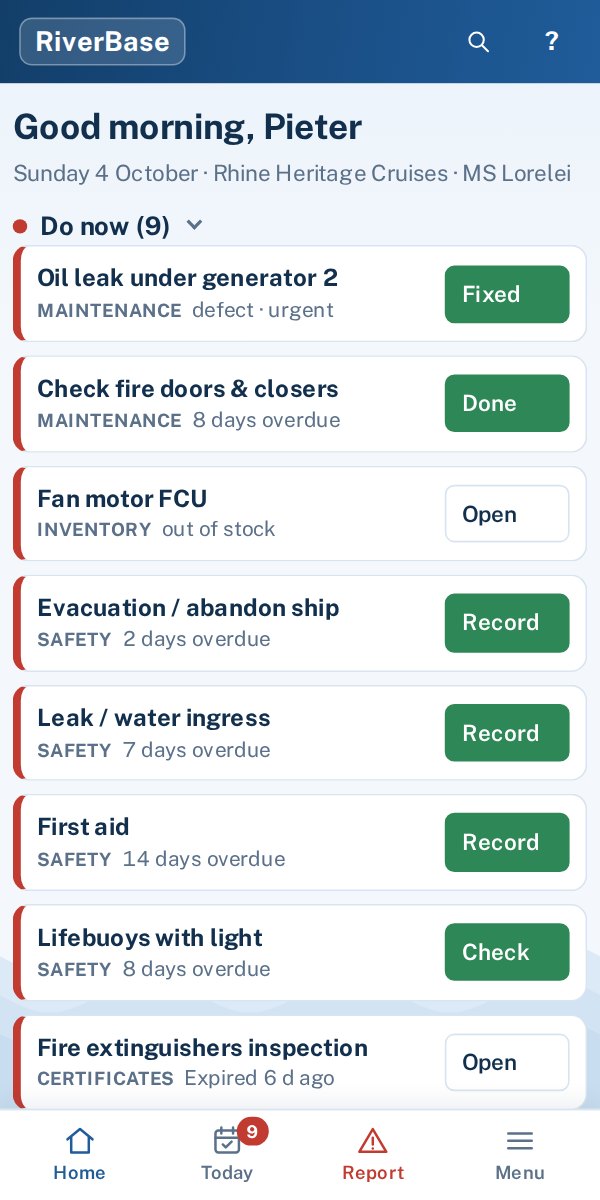
RiverBase on a phone: today's tasks with a Done button
Works without internetNo signal on the river? You keep working. It sends everything later.
Phone, tablet and PCInstall it as an app, or use the Windows program with notifications.
Everyone sees their own partThe chef the galley, the engineer the engine room, the office the fleet.
I set it up with youYour Excel lists go in. Your crew can start within a few days.

Sound familiar?

Maintenance in Excel, on a laptop that just went ashore with the engineer.

Certificates in a binder. You find out one has expired when the inspector asks for it.

Repairs in a WhatsApp group, between the birthday messages.

I had that on every ship I sailed. That is why I made RiverBase. – Wouter

How it works

Three steps. I do the first one with you.

Choose what you switch on per shipMaintenance, safety, roster, HACCP, gangway: only what you need. I set up your ship and bring in your Excel lists.
The crew works on a phoneEveryone opens one list: what needs doing today. Signing off is one tap, also without internet.
The office sees the whole fleetWhat expires, what is overdue and where things almost went wrong, per ship. With a PDF for the inspector.

Look along on board

Two minutes through RiverBase, module by module, with sound. Made for river cruise ships, by a captain.

Rather see it live with your own ship? Book a demo

What it solves

Switch on what you need per ship. You can add more later.

Maintenance & certificates

No more certificates that expire unnoticed.

  • Maintenance. Planned maintenance on dates or running hours, per engine and area. One tap to sign off. The history stays with the ship.
  • Certificates & Green Award. All certificates with expiry date and scan, warned in time. Plus your Green Award score and dossier, made from what the crew already records.
  • Spare parts. Stock per store, minimum stock and order lists per supplier.

Safety

Ready for every inspection.

  • Drills and checklists. Drill plan with reports and participants, monthly safety checklist and cabin inspections.
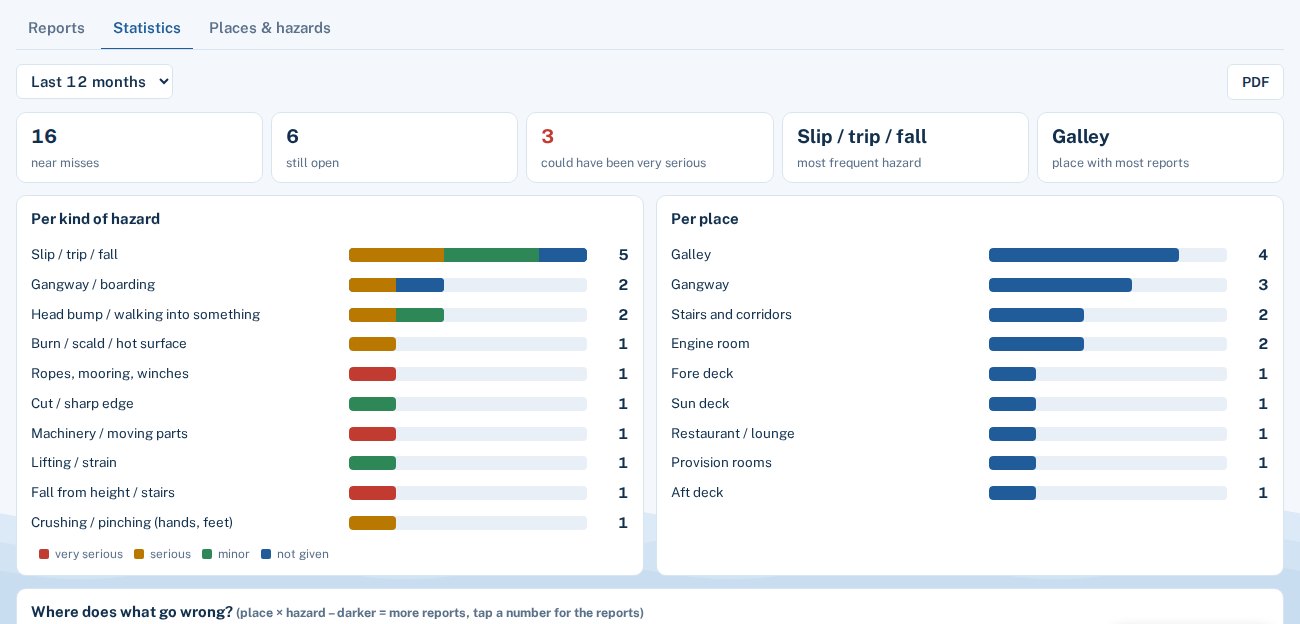
  • Near misses. Reported with a photo, per hazard and per place. You see where it goes wrong most, before something happens.
  • Gangway. Guests and crew check in and out with their cabin card. You always know who is on board.

Crew & planning

Who sails where, and is that allowed?

  • Roster per team. One timeline per team: nautical crew, office, restaurant, bar, galley and housekeeping. Scroll as far ahead as you like.
  • Fleet planning. Who sails on which ship. It checks the minimum crew and valid papers. Crew can say “I can” to an open place.
  • In-port manning. Who stays on board in port. It follows the rotation, can be set to every other day and checks first aid, breathing apparatus and safety expert.

Hotel & operations

From the galley to the voyage.

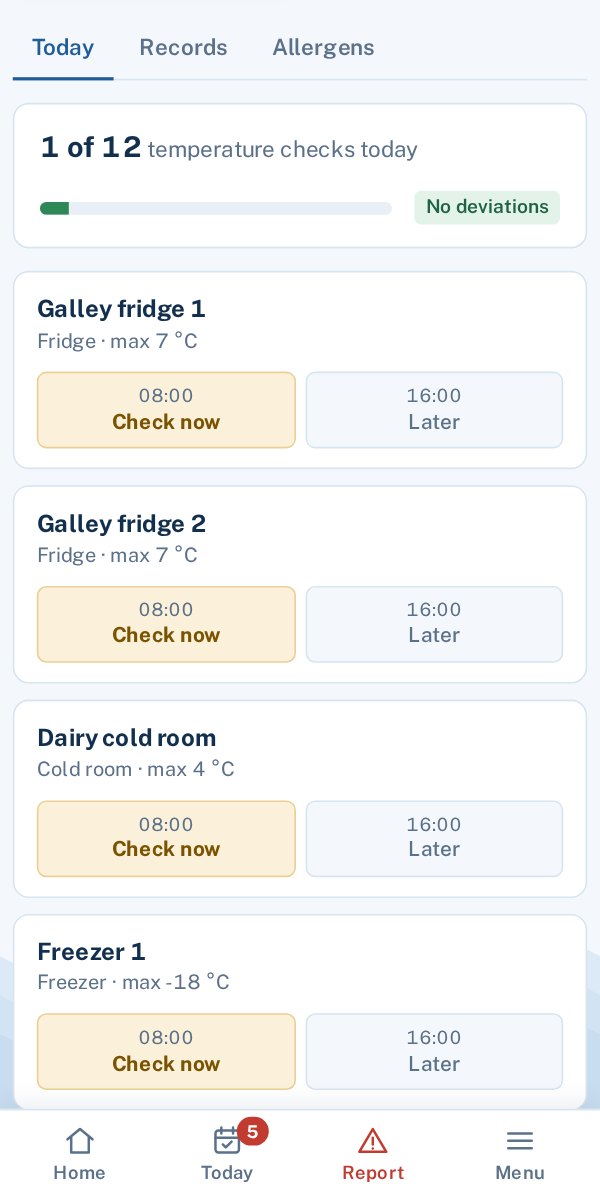
  • Hotel & HACCP. Fridge and freezer checks on a phone, cleaning plan, allergens per dish and a monthly HACCP report.
  • Repair book. Reception reports a repair. The engineer sees it at once and keeps everyone informed.
  • Voyage planning. Calls, berths and services per ship. Your caterer can look along without an account.
  • Cruise report. Passengers, waste, water and fuel per cruise – and per week or month in one chart, so you see the peaks per person per night.

Also included: crew documents with expiry warnings, day sheets and hours, crew cabins, your own functions and teams, and a PDF of every list.

Works for tankers and cargo ships too: you leave the hotel modules off.

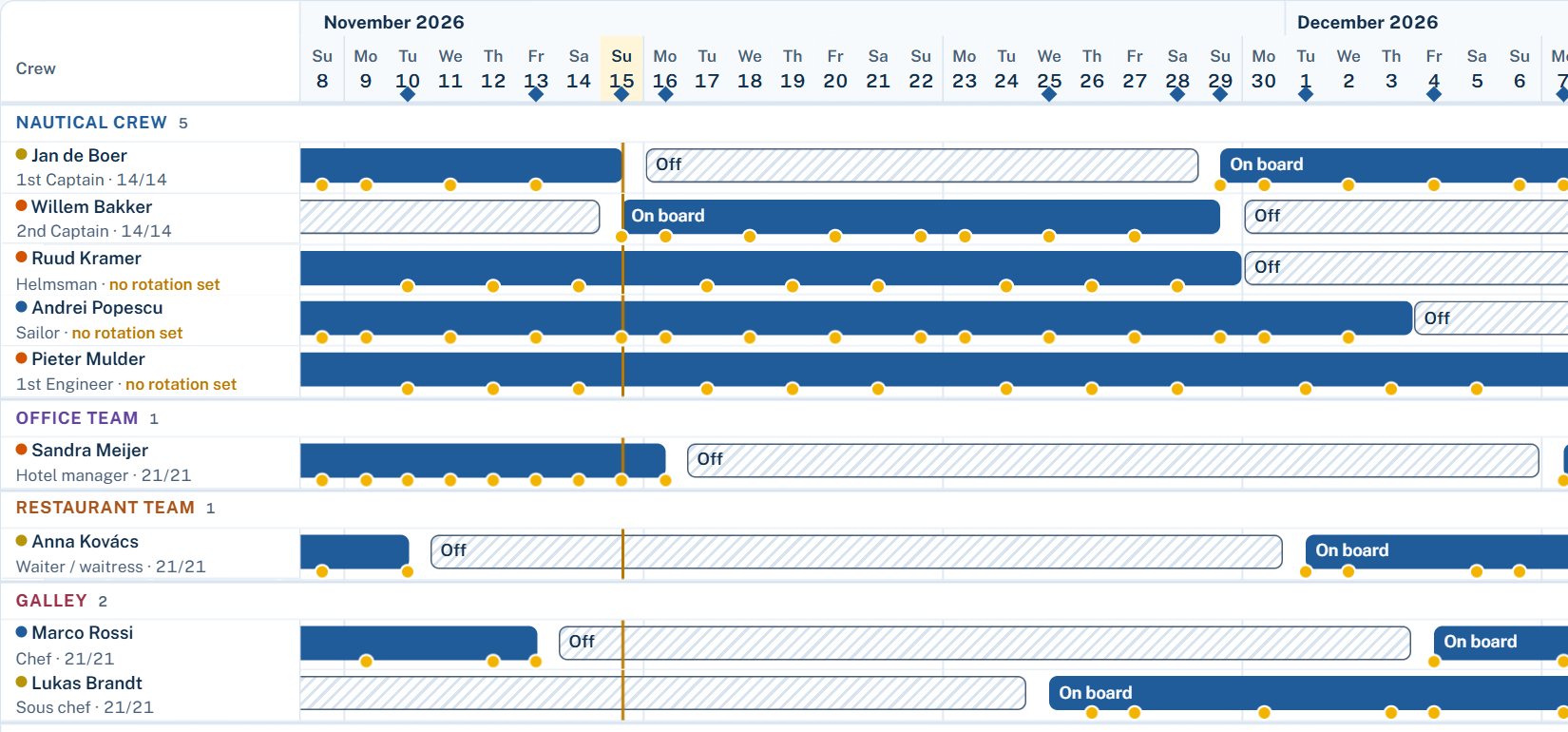
The roster per team

Every team has its own lines: nautical crew, office, restaurant, bar, galley and housekeeping. Make your own functions and put them in the right team. Tap a day to change it: leave, sick, a half day or an extra trip on another ship.

  • Rotations like 14/14 or 21/21 run by themselves
  • You see who changes over, and where
  • The in-port manning follows the roster
Crew roster per team as a timeline

Open it and see what needs doing today

Every crew member starts with one list: what to do now and what is coming soon, from every module together. Each line has the button that does it.

  • Sign off a task, a drill or the safety list in one tap
  • Running hours, temperatures and day sheets on a phone
  • Report a problem or a near miss with a photo
Today list on a phone
HACCP temperature checks on a phone

See where things almost go wrong

Near misses are reported per hazard and per place. You see where on board it goes wrong most, before something happens.

  • Drill plan with reports and participants
  • Monthly safety checklist and cabin inspections
  • Figures and a PDF for the office and the inspector
Near miss statistics per hazard and place

Check in and out at the gangway

On a river cruise people go ashore all day. With RiverBase Gangway you know at any moment who is on board, also when the ship has no internet.

  1. Link the cardsEvery guest and crew member gets their cabin card linked once: hold the card on the reader and click the name.
  2. Hold the card at the gangwayGoing ashore or coming back: hold the card against the reader on the gangway PC, or against an Android phone. The screen shows the name and the cabin.
  3. See who is on boardThe list shows who is on board and who is ashore. Before departure you see at once who is still missing.
  • Works over the ship's Wi-Fi, also without internet
  • Crew on the in-port manning get a warning when they want to go ashore
  • Guest mode fills the screen. Only crew can unlock it.
  • A card reader on a Windows PC, or the Android app with NFC

Missing something? I build it.

RiverBase grows with the ships that use it. The gangway, the in-port manning and the roster per team all started as a question from a crew. Do you need a module or a list that is not there yet? Tell me. I am always open to new ideas and to making RiverBase better.

How to start

You don't have to set it all up yourself. I do the first part with you.

Ask for the trialFill in the form or call me. I call you back within one working day.
I set up your shipFrom a river cruise template. Your maintenance and stock lists come in from Excel.
30 days freeYour crew uses it on board. After 30 days you choose: a yearly subscription, or you stop. No costs.
Wouter Rietveld in captain's uniform on board a river cruise ship

Built on board

I was a captain on tankers. Since 2023 I sail river cruise ships, and I also supervise the building of new passenger ships.

RiverBase is what I missed on board myself. I set it up with you, on your ship, and you can always call me.

One family of tools

RiverBase is made by the same people as RoadFleet and PortList Pro. Same idea every time: simple, built for people who work outside the office.

River cruise shipsRiverBase

Maintenance, safety, crew, hotel and HACCP for river cruise ships. Works on board, also offline.

You are hereTry RiverBase 30 days free
VehiclesRoadFleet

Fleet management for trucks, tow trucks and vans: service, APK, tachograph, faults and costs per licence plate.

Go to RoadFleet ›
Inland shippingPortList Pro

All berths with drinking water, shore power and waste on one map, with a route planner for the European waterways.

Go to PortList Pro ›

One subscription per ship per year

You pay per ship, only for the modules you switch on. First you try it 30 days for free.

Price indication

€ 1.200 per ship per year for the platform

plus € 150 per module per ship per year

Example: the platform with maintenance, safety and roster is € 1.650 per ship per year, about € 138 a month.

An indication, excl. VAT. You get a quote for your fleet.

Always included
  • 30 days free to try, on your own ship
  • Setting up your ships and importing your Excel lists
  • All updates and new features
  • Backups, data stored in Europe
  • Unlimited users on board and in the office
  • Help by phone, WhatsApp and e-mail

Book a demo or try it free

20 minutes by phone or Teams: I show RiverBase with your kind of ship. Leave your name and your phone number or e-mail address. I call or mail you within one working day.

I would like

We only use your details to answer you. See the privacy statement.

Questions

How fast is a ship live?

Within a few days. I set up your ship from a river cruise template and bring in your Excel lists. You don't have to build anything yourself.

How do I get my crew on board?

Everyone only sees their own part and opens one list with what needs doing today. Signing off is one tap. No day of training: I go through it once with the officers, and the crew can call me too.

What does the trial cost?

Nothing. I set up your ship and your crew uses RiverBase for 30 days. If you don't continue, it stops and we delete your data on request.

Is it a subscription?

Yes. One subscription per ship per year, for the modules you use. In RiverBase you always see until when it runs.

Does it work without internet on board?

Yes. RiverBase keeps a copy on the device. The crew keeps working without signal, and everything is sent as soon as there is internet again.

What do we need for the gangway?

A Windows PC with a card reader for your cabin cards, or an Android phone with NFC. It works over the ship's Wi-Fi, also without internet. We check together whether your cards work with it.

Do we need to install anything?

No. RiverBase runs in the browser and installs as an app on iPhone, Android, tablets and computers. For Windows there is also a program with notifications.

Can we bring our existing lists?

Yes. Maintenance tasks, spare parts, safety equipment and drills can be imported from Excel. I help you with the first import.

Who sees what?

Every person gets the rights of their job: a deckhand sees their own roster and documents, the chef the galley, the office the whole fleet. You can change rights per role and per person.

Does it work for tankers or cargo ships?

Yes. Maintenance, certificates, drills, crew documents and spare parts work the same on any ship. You leave the hotel modules off and only pay for what you use.

Where is our data kept?

On secure servers in London, run by Supabase on Amazon Web Services. All traffic is encrypted, every company only sees its own data, and there is an extra backup every week.

Is RiverBase GDPR compliant?

We only store what is needed to run the ship. You decide who sees what. We never sell or share your data, and personal data is removed on request. A data processing agreement is available on request.

Can we leave and take our data with us?

Yes. One button exports everything: Excel files plus all photos and documents in one zip file. When you stop, we delete your data on request.

Can you build something extra for us?

Yes. Many parts of RiverBase started as a wish from a crew. Tell me what you need. If it is useful for more ships, I build it into RiverBase.

Can partners like our caterer see the planning?

Yes. You can approve external planners by e-mail. They see the voyage planning of your ships, nothing else.
Shall we look at it with your ship?

20 minutes, by phone or Teams. After that 30 days free on your own ship.

info@river-base.com · +31 6 41797246